Most Kafka introductions hand you five tools at once: brokers, Connect, Schema Registry, Streams, the cloud version. You learn each one separately, and it’s hard to see why any of them exist.
So in this post I’ll do it the other way round. We’ll follow one food order, from the moment someone taps “Place Order” to the moment every system that cares about it knows. Each piece of the Kafka ecosystem shows up only when the order needs it.
A quick but important note first. I use a Swiggy order because everyone in Hyderabad knows what it feels like to wait for one. It’s a teaching example. This is not a description of how Swiggy actually builds its systems. I don’t have any access to Swiggy’s internals, and nothing here should be read as how they do it. The pipeline below is one I built locally on my laptop to explain the concepts.
The problem: one order, four apps
When you place a food order, that single event matters to at least four systems:
- The restaurant app, so they start cooking.
- The delivery partner app, so a rider gets assigned.
- The payments service, so your card gets charged.
- Notifications, so you get “order confirmed”.
The obvious way to build this is for the order service to call all four directly. That works, until it doesn’t. Now you have four integrations, four retry policies and four different ways to fail. And when product says “we’re adding fraud detection next quarter”, you’re back in the order service’s code, touching the same fragile spot again.
This isn’t a Kafka problem. It’s the point-to-point integration problem every growing system hits. Kafka is one good answer to it.
Kafka core: a log, not a queue
With Kafka, the order service publishes one event and stops caring who reads it.
- Producers write events in. Here, that’s the app when you place the order.
- Kafka stores them in a durable, ordered log.
- Consumers read them out. The restaurant app, the delivery app, the notification service.
The key idea: Kafka is a log, not a queue that forgets. Once an event is written, it stays there for as long as you configure retention. Anyone can read it, any number of times, at their own pace. I like to compare it to a WhatsApp group’s chat history versus a phone call. After a call, the information is gone unless someone took notes. A chat history can be scrolled back, and someone who joins later can still read everything.
That’s why a traditional queue is a different tool. Queues like SQS or RabbitMQ are great when you want a message handled once and then gone, like a task queue. Kafka shines when several independent systems need the same stream of truth. With Kafka you get:
- Multiple readers of the same event, natively, through consumer groups.
- Replay of old events whenever you need them.
- New readers that just subscribe, with zero changes to the producer.
- Ordering per partition, at high throughput.
Topics and partitions
Events live in a topic, and a topic is split into partitions. In my demo, the orders topic has 3 partitions.
When a producer sends an event with a key, Kafka hashes the key to pick a partition. If the key is the customer ID, all of one customer’s orders land on the same partition, in the order they happened. That matters a lot later, when we compute a running total per customer. If a customer’s orders were spread across partitions, they could be processed out of order.
Why orders don’t get lost
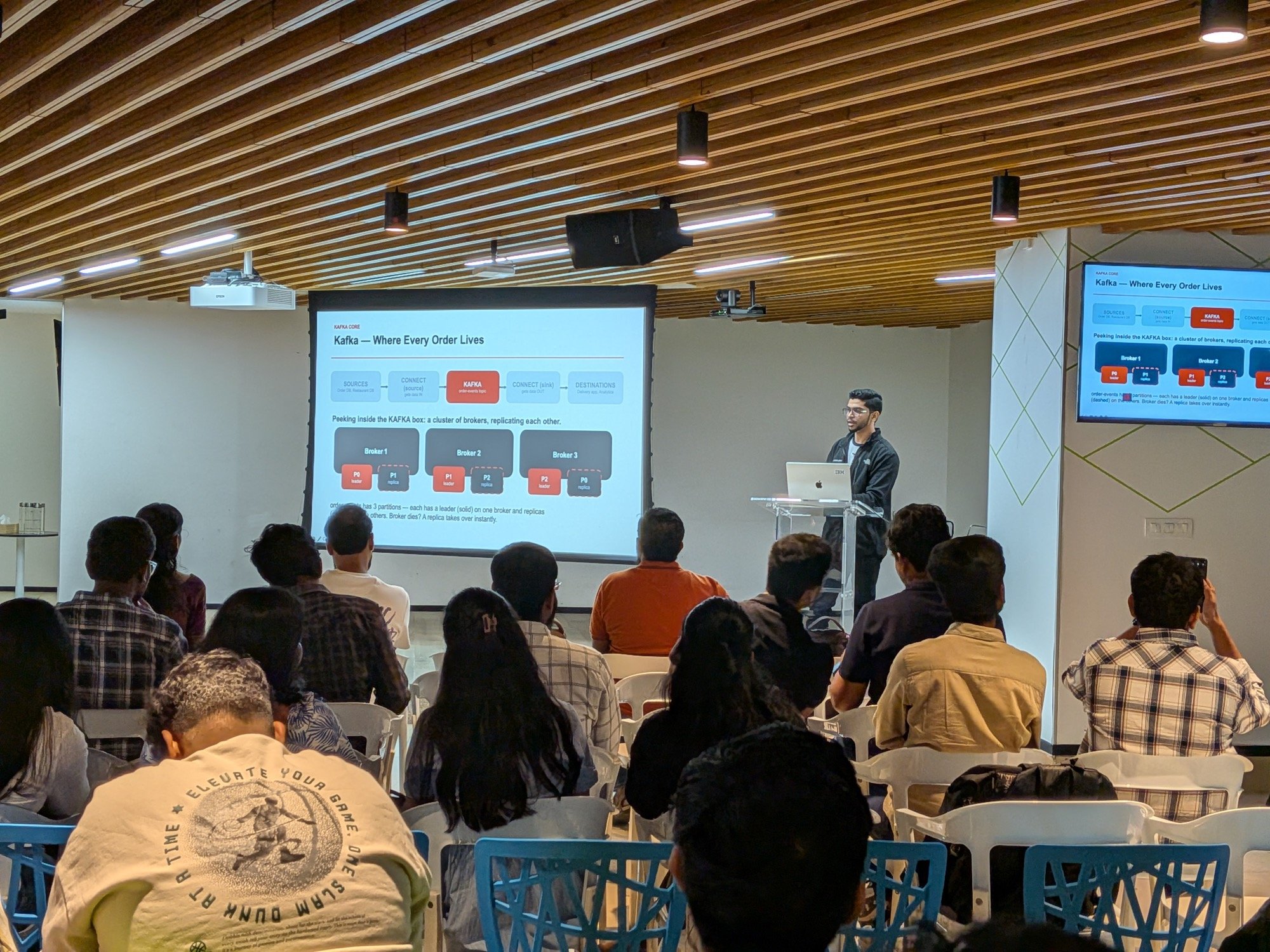
Each partition is replicated across brokers. One replica is the leader and handles reads and writes. The others are followers that copy everything. If the broker holding a leader dies, a follower takes over. That’s the guarantee that lets people trust Kafka with orders and payments, not just logs. The Apache Kafka docs cover this in more depth.
Kafka Connect: getting the order in, with no code
So we have a durable log. How does the order get from the database into Kafka?
The tempting answer is a polling script: query the orders table every few seconds, produce new rows to Kafka. It looks like ten lines. It isn’t. Who handles crashes? Restarts without duplicates? Parallelism? Bad records?
Kafka Connect is the framework for exactly this. You don’t write the integration. You write a JSON config, and a pre-built connector does the work. Connect handles restarts, scales by adding workers, gives you a REST API to manage pipelines, and has dead letter queues built in.
For the source side I used the Debezium PostgreSQL connector. It uses change data capture (CDC). Instead of asking the database “anything new?” over and over, it reads Postgres’s own change log, the write-ahead log that Postgres also uses for replication. Every insert or update shows up as an event.
The table in my demo is deliberately small:
CREATE TABLE IF NOT EXISTS orders (
    order_id       SERIAL PRIMARY KEY,
    customer_id    VARCHAR(20) NOT NULL,
    amount_cents   INTEGER NOT NULL,
    currency       VARCHAR(3) NOT NULL DEFAULT 'INR',
    status         VARCHAR(20) NOT NULL DEFAULT 'PLACED',
    created_at     TIMESTAMPTZ NOT NULL DEFAULT now()
);
Postgres needs wal_level=logical for this to work. And here is the connector config, trimmed slightly:
{
  "name": "debezium-orders-source",
  "config": {
    "connector.class": "io.debezium.connector.postgresql.PostgresConnector",
    "tasks.max": "1",
    "database.hostname": "localhost",
    "database.port": "15432",
    "database.dbname": "orders_db",
    "topic.prefix": "order-events",
    "table.include.list": "public.orders",
    "plugin.name": "pgoutput",
    "errors.tolerance": "all",
    "errors.deadletterqueue.topic.name": "order-events-dlq",
    "transforms": "unwrap",
    "transforms.unwrap.type": "io.debezium.transforms.ExtractNewRecordState",
    "value.converter": "io.confluent.connect.avro.AvroConverter",
    "value.converter.schema.registry.url": "http://localhost:18081"
  }
}
A few things worth pointing out:
- Debezium names the topic
<topic.prefix>.<schema>.<table>, so events land inorder-events.public.orders. ExtractNewRecordStateflattens Debezium’s change event envelope down to just the new row. Downstream code then sees plain order fields. The event flattening docs explain the full envelope.- The
errors.*lines set up a dead letter queue. More on that in the gotchas. - The Avro converter registers the record’s schema with Schema Registry. That’s the next stop.
You create the connector with one REST call: POST the JSON to Connect’s /connectors endpoint. Then you insert a row into Postgres, and within a second or two it’s on the topic. No polling code.
The same idea works in reverse. A sink connector reads the topic and writes to a warehouse, a search index or object storage. The nice part is that it’s the same topic already feeding delivery and notifications. Adding the sink changes nothing upstream.
Schema Registry: the Friday 4:58pm rename
Here’s a scenario I used in the talk. It’s Friday, 4:58pm. A developer renames price to amount in the order event and ships it.
Kafka doesn’t care. It stores bytes. It has no idea what’s inside them.
On Monday, the restaurant app reads price and gets nothing, so it doesn’t know the bill. Another consumer crashes outright. The analytics dashboard shows zero revenue for the weekend. Nobody noticed until the damage was done.
Schema Registry exists to stop this. It works in three steps:
- The shape of the order event is registered once, as a schema.
- Every time someone tries to register a new version, Schema Registry checks it against the configured compatibility rule.
- Safe changes are accepted. Breaking changes are rejected at registration time, before anything ships.
Compatibility modes
There are four main modes. The schema evolution docs also cover the transitive variants.
- NONE: no checks. I’d avoid this in production.
- BACKWARD: the default. A consumer using the new schema can read data written with the old schema. Upgrade consumers first.
- FORWARD: a consumer on the old schema can read data written with the new schema. Useful when producers have to deploy before consumers. Upgrade producers first.
- FULL: both directions hold. Most restrictive, and the safest when many teams can’t coordinate deploy order.
The part people get wrong
A lot of people assume removing a field is the dangerous change. Under BACKWARD, it isn’t. A new reader simply ignores the extra field that old records carry.
The dangerous change under BACKWARD is adding a required field with no default. The new reader has no way to fill in that field for old records that never had it. I mixed this up myself while preparing the demo.
That also explains the Friday rename. To Avro, renaming price to amount looks like removing price and adding a new field called amount. Removing price is fine under BACKWARD. Adding amount with no default is not. So the rename gets rejected, and the Friday deploy never goes out.
In the demo I tested two candidate schemas against the registry using the compatibility endpoint, which validates without registering anything. This new field passes, because it’s optional with a default:
{"name": "discount_code", "type": ["null", "string"], "default": null}This one fails, because it’s required with no default:
{"name": "delivery_fee_cents", "type": "int"}The check is a single call:
curl -s -X POST -H "Content-Type: application/vnd.schemaregistry.v1+json" \
  --data @payload.json \
  http://localhost:18081/compatibility/subjects/order-events.public.orders-value/versions/latest
It returns is_compatible: true or false. I also showed the same thing with a real ALTER TABLE orders ADD COLUMN discount_code VARCHAR(20). Debezium picked up the new nullable column through CDC, and a new schema version was registered without restarting the connector.
Kafka Streams: a running total per customer
Now let’s compute something live: how much each customer has spent, excluding cancelled orders.
Kafka Streams is a library, not a separate cluster. It runs inside your own Java application. Here’s the core of the demo app, lightly simplified:
builder.stream("order-events.public.orders", Consumed.with(avroSerde, avroSerde))
    // A cancelled order shouldn't count toward the running total
    .filter((key, order) -> "PLACED".equals(String.valueOf(order.get("status"))))
    .selectKey((key, order) -> String.valueOf(order.get("customer_id")))
    .groupByKey(Grouped.with(Serdes.String(), avroSerde))
    .aggregate(
        () -> 0L,
        (customerId, order, total) -> total + (Integer) order.get("amount_cents"),
        Materialized.<String, Long, KeyValueStore<Bytes, byte[]>>as("order-totals-store")
            .withKeySerde(Serdes.String())
            .withValueSerde(Serdes.Long()))
    .toStream()
    .mapValues(String::valueOf)
    .to("order-totals", Produced.with(Serdes.String(), Serdes.String()));
Reading it top to bottom:
- filter keeps only
PLACEDorders. - selectKey re-keys each order by
customer_id. The CDC topic is keyed by the table’s primary key,order_id, so this step matters. Kafka Streams repartitions the data through an internal topic so all of one customer’s orders reach the same task, in order. This is the partitioning idea from earlier, doing real work. - aggregate keeps a running total in a local state store. The store is backed by a changelog topic in Kafka, so if the app crashes, a new instance rebuilds the same state.
- The result goes to an
order-totalstopic. I write it as a string so it’s readable in any console consumer.
The app also sets processing.guarantee to exactly_once_v2, so the total isn’t double-counted if something restarts mid-flight.
One honest limitation: this filter handles orders inserted as cancelled. It doesn’t subtract an order that was placed and then later updated to cancelled. A real system would need to track each order’s latest state for that. For a demo, the simple version makes the point.
Why not just query a database for this? Polling is only as fresh as your poll interval, and every app that wants the number adds load to the source. Streams reads the log once and updates the instant an order arrives. It flips the model from “ask over and over” to “get told when something changes.”
Self-managed or Confluent Cloud
Everything above ran on my laptop with Confluent Platform. You can also run the same architecture on Confluent Cloud: same topics, same connectors, same Schema Registry, without running the servers yourself. I work at Confluent, so take this with that in mind, but here’s how I’d honestly think about it.
Self-managed suits teams with on-prem or air-gapped requirements, or teams that already have strong Kafka operations. You patch the brokers, you plan capacity ahead of big traffic spikes, and you wire up your own monitoring.
A managed service suits teams that want to get to production quickly with a small ops team. Someone else patches brokers and handles scaling.
It’s also worth knowing what’s free. Kafka itself, Kafka Connect and Kafka Streams are Apache 2.0. Schema Registry is free under the Confluent Community License. Some enterprise features need a subscription. Plenty of teams run a mix of self-managed and cloud, and that’s a legitimate setup too.
Gotchas that bite in production
- Pick your partition count for peak load up front. Adding partitions later changes which partition a key maps to, which breaks the per-key ordering everything above relies on.
- Add new fields as optional, with a default. Don’t rename or remove fields without coordinating with the teams that consume them.
- Always configure a dead letter queue on Connect. One bad record should never stop the whole pipeline. With
errors.tolerance=alland a DLQ topic, bad records are set aside and the rest keep flowing. Do watch the DLQ, though, or failures just become quiet. - Watch consumer lag. If I could alert on only one metric, it would be this. It’s the earliest sign that something downstream is falling behind, before users notice.
Key takeaways
- Kafka is a durable, ordered log, not a queue that forgets once read.
- Kafka Connect gets data in and out without custom integration code. Debezium CDC turns database changes into events.
- Schema Registry stops breaking changes before they ship. Under BACKWARD, the risky change is a new required field with no default.
- Kafka Streams computes live answers straight from the log, with fault-tolerant local state.
- Confluent Cloud runs the same architecture without you managing the servers. Whether that’s right for you depends on your constraints.
I gave this as a talk at Apache Kafka Meetup Hyderabad in September 2026. See the talk page.
Was this useful?

Senior Software Engineer at Confluent, based in Hyderabad. I write about building software and what I learn along the way. More about me